

Many people find MIG welding with a Lincoln welder both exciting and challenging. Getting those perfect welds takes more than just steady hands—it demands the right settings for your machine. If your settings are off, you could end up with weak joins, too much spatter, or even burn-through holes.
On the other hand, dial in your Lincoln MIG welder settings correctly, and you’ll get strong, clean welds every time. But how do you know what settings to use? With so many variables—wire speed, voltage, material thickness—it can feel confusing, especially for beginners or those who don’t weld every day.
This guide will help you understand the Lincoln MIG welder settings chart and how to use it for different projects. You’ll see how to read the chart, adjust your machine, and avoid common mistakes.
Whether you’re welding mild steel, stainless, or aluminum, you’ll find practical tips and real-world examples to make your welding work easier, safer, and more reliable.
What Is A Lincoln Mig Welder Settings Chart?
A settings chart is a reference tool that comes with most Lincoln MIG welders. It shows recommended values for key welding parameters. These charts are often placed inside the welder’s door or included in the user manual. The chart lists settings like:
- Material thickness (how thick your metal is)
- Wire diameter (the size of the wire you’re using)
- Voltage (controls heat and arc length)
- Wire feed speed (how fast the wire comes out)
- Shielding gas type and flow rate
These values are not random. Lincoln Electric tests their machines and provides these charts to help users get good results quickly. Using the chart saves time and reduces guesswork, especially for people who are new to welding.
Why Proper Settings Matter In Mig Welding
Setting your welder correctly is not just about following instructions. The right settings determine:
- How deep the weld penetrates the metal
- The strength and appearance of the weld
- The amount of spatter and clean-up required
- If the weld will hold under stress
If your settings are too low, the weld might sit on top of the metal and not fuse properly. Too high, and you could burn through or make a messy weld. The settings chart helps you avoid these problems by giving you a reliable starting point.
Key Parameters In The Lincoln Mig Welder Settings Chart
Understanding the parameters in the chart is the first step to using it effectively. Here’s what each setting means and why it matters:
Material Thickness
This tells you how thick the metal is, usually in inches or millimeters. Thicker metal needs more power (higher voltage and wire speed) to melt and join properly. For example, welding a car body panel (thin steel) uses lower settings than welding a trailer frame (thick steel).
Wire Diameter
Lincoln MIG welders commonly use wire sizes like 0.023”, 0.030”, 0.035”, or 0.045”. Thicker wires handle more power and are used for thicker materials. Thin wire is better for sheet metal and precise work.
Voltage
Voltage controls the arc length and heat. Higher voltage creates a longer arc and more heat, needed for thicker metals. Too much voltage can create a flat, wide bead and too little can make the arc unstable.
Wire Feed Speed
This is measured in inches per minute (ipm) or millimeters per minute (mpm). Higher speeds give more weld metal, but if it’s too fast, the wire can pile up or cause spatter. Too slow, and the arc might cut out or make a thin, weak weld.
Shielding Gas
Common choices are 100% CO2 or 75% Argon/25% CO2 (C25) for steel. The gas protects the weld from contamination. The type and flow rate (measured in cubic feet per hour, CFH) affect the weld’s quality and appearance.
Polarity
Most MIG welding with solid wire uses DCEP (Direct Current Electrode Positive). This gives better penetration and a stable arc.
How To Read And Use The Lincoln Mig Welder Settings Chart
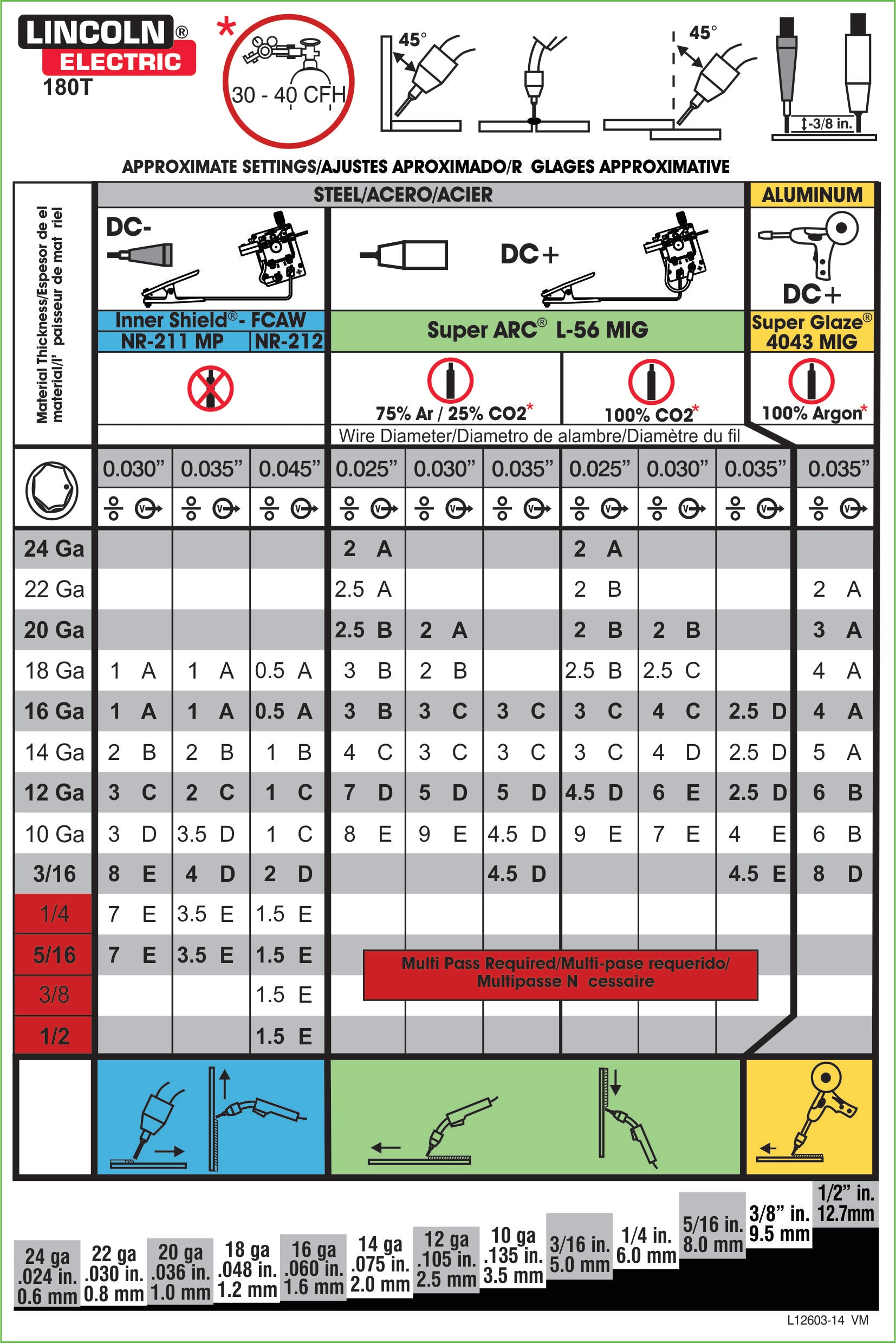
When you open your Lincoln welder or look in the manual, you’ll see a chart that looks something like this:
| Material Thickness | Wire Diameter | Voltage | Wire Speed (ipm) | Gas Type |
|---|---|---|---|---|
| 18 ga (1.2 mm) | 0.023” | 16.5 V | 230 | 75% Ar / 25% CO2 |
| 1/8” (3.2 mm) | 0.030” | 19 V | 340 | 75% Ar / 25% CO2 |
| 1/4” (6.4 mm) | 0.035” | 21.5 V | 450 | 100% CO2 |
To use the chart:
- Find your material thickness (for example, 1/8” steel).
- Look for your wire size (what you have installed).
- Set the voltage and wire speed as recommended.
- Use the right gas and flow rate.
- Adjust slightly if needed—the chart is a starting point, not a strict rule.
Lincoln Mig Welder Settings Chart Examples
Let’s look at real-world examples for popular Lincoln MIG welders. These will help you see how to apply the chart for different metals and situations.
Example 1: Lincoln 140 Mig Welder (for Mild Steel)
This is a common home and auto welder. Here’s a settings chart for mild steel, using C25 gas and 0.030” wire:
| Material Thickness | Voltage (V) | Wire Speed (ipm) | Polarity |
|---|---|---|---|
| 24 ga (0.6 mm) | 12.5 | 90 | DCEP |
| 18 ga (1.2 mm) | 14.0 | 120 | DCEP |
| 1/8” (3.2 mm) | 18.0 | 250 | DCEP |
Notice how as the metal gets thicker, both the voltage and wire speed increase.
Example 2: Lincoln 180 Mig Welder (for Stainless Steel)
Stainless steel needs slightly different settings and gas (usually 98% Argon/2% CO2):
| Material Thickness | Wire Size | Voltage (V) | Wire Speed (ipm) | Gas Type |
|---|---|---|---|---|
| 20 ga (0.9 mm) | 0.030” | 15.0 | 130 | 98% Ar / 2% CO2 |
| 1/8” (3.2 mm) | 0.035” | 19.5 | 300 | 98% Ar / 2% CO2 |
Stainless steel usually needs lower voltage than mild steel for the same thickness.
Example 3: Lincoln 210 Mp (for Aluminum)
Aluminum is more difficult because it conducts heat quickly and uses 100% Argon gas.
| Material Thickness | Wire Size | Voltage (V) | Wire Speed (ipm) | Gas |
|---|---|---|---|---|
| 1/16” (1.6 mm) | 0.030” | 17.5 | 300 | 100% Argon |
| 1/4” (6.4 mm) | 0.035” | 22.0 | 470 | 100% Argon |
Aluminum requires higher wire speed and voltage compared to steel.
Factors That Affect Your Settings
The chart gives a good starting point, but you may need to adjust the settings based on:
- Metal Condition: Rusty, painted, or oily metal needs more cleaning and may require higher voltage.
- Joint Type: Butt joints, lap joints, and fillet joints all behave differently.
- Welding Position: Overhead and vertical welds may need lower voltage and speed for better control.
- Ambient Conditions: Wind can blow away shielding gas, causing porosity. Indoors vs outdoors can make a big difference.
- Extension Cord Use: Long or thin extension cords can cause voltage drop, making the welder weaker.
Credit: www.weldingweb.com
How To Adjust Settings For Best Results
Even with the chart, real-world welding often needs some tweaking. Here’s how you can fine-tune your Lincoln MIG welder:
Start With The Chart
Always begin with the chart settings. Set your wire feed speed and voltage as recommended for your wire size and material thickness.
Perform A Test Weld
Take a scrap piece of the same metal and do a short weld. Look for:
- Good penetration: The weld bead should melt into both pieces, not just sit on top.
- Stable arc: You should hear a steady, crackling sound (like frying bacon).
- Minimal spatter: Too much spatter means settings are off.
Adjust As Needed
- If the weld is sitting on top or not joining well, increase voltage or wire speed.
- If you burn through or the bead is too flat, reduce voltage or wire speed.
- If the arc is unstable or wire is pushing back, adjust the wire speed.
Check Gas Flow
Set your gas regulator to the recommended flow (usually 20-25 CFH for most work). Too little gas causes porosity; too much can waste gas and pull in air.
Watch For Non-obvious Details
- Contact tip size: Using the wrong size tip for your wire causes feeding problems.
- Stick-out distance: Keep the wire stick-out (from tip to work) about 3/8 inch for most jobs. Too long reduces heat, too short can clog the tip.
Common Mistakes Beginners Make With Lincoln Mig Welder Settings
Even with a chart, some mistakes are easy to make. Here are a few to watch out for:
- Ignoring wire diameter: Using the wrong settings for your wire size leads to bad welds.
- Not checking polarity: Double-check your cables are set for DCEP (for solid wire).
- Forgetting about gas type: Using CO2 when you need Argon can ruin aluminum or stainless welds.
- Welding dirty metal: Even the perfect settings won’t fix a dirty joint—always clean your work.
- Not testing settings: Don’t skip the test weld! Every batch of steel can act differently.
- Using preset dials only: Some welders have “A, B, C, D” dials instead of numbers. Always compare these to the chart in your manual.
- Rushing the setup: Taking five extra minutes to check your setup can save hours of grinding and rework.
Lincoln Mig Welder Settings For Different Materials
It’s important to use the right settings not just for thickness, but also for the metal type. Here’s a quick summary:
Mild Steel
- Wire: ER70S-6, 0.023”–0.035”
- Gas: C25 (75% Argon, 25% CO2)
- Polarity: DCEP
- Settings: Follow chart, adjust for thickness
Stainless Steel
- Wire: ER308L or ER309L, 0.030”–0.035”
- Gas: 98% Argon/2% CO2 or Tri-mix
- Polarity: DCEP
- Settings: Slightly lower voltage than steel
Aluminum
- Wire: ER4043, 0.030”–0.035”
- Gas: 100% Argon
- Polarity: DCEP
- Settings: Higher voltage and wire speed than steel
How To Create Your Own Lincoln Mig Welder Settings Chart
Sometimes, you may need to create your own chart for special jobs or if you lose the original. Here’s how:
- Record your settings: After a successful weld, write down the voltage, wire speed, gas, and material thickness.
- Test different combinations: Try slight changes and see what works best.
- Note special conditions: Welding outside? Using flux-cored wire? Record that too.
- Update your chart: Over time, you’ll have a personal chart that works for your machine and style.
Credit: device.report
Lincoln Mig Welder Settings Vs. Other Brands
You might wonder if Lincoln settings charts are different from Miller or Hobart. The answer: they’re similar but not identical. Each company tests their machines and wires, so their recommended settings may differ slightly. Always use the chart for your specific welder as your main guide.
Here’s a comparison of typical settings for 1/8” mild steel, using 0.030” wire and C25 gas:
| Brand | Voltage (V) | Wire Speed (ipm) |
|---|---|---|
| Lincoln | 18.5 | 290 |
| Miller | 18.0 | 300 |
| Hobart | 19.0 | 285 |
As you can see, the numbers are close, but it’s best to follow your own welder’s chart first.
Advanced Tips For Using Lincoln Mig Welder Settings Charts
- Don’t be afraid to experiment: Charts are guides, not laws. Small changes can make a big difference.
- Keep a logbook: Write down what worked and what didn’t for future reference.
- Update your chart for new wires: Different brands or types of wire may need different settings.
- Practice different positions: Overhead or vertical-up welding often needs lower wire speed for better control.
- Watch arc sound: A smooth, steady crackle usually means good settings. A loud pop or hiss means something is off.
- Learn to read the weld bead: A tall, narrow bead = too little heat. A flat, wide bead = too much heat.
Where To Find Official Lincoln Mig Welder Settings Charts
You can find the official settings charts in several places:
- Inside the welder’s door: Most Lincoln MIG machines have a sticker with the chart.
- User manual: Downloadable from the Lincoln Electric website.
- Lincoln Electric’s website: Visit the Lincoln Electric MIG Welding Resource for charts, calculators, and guides.
- Welding forums and community sites: Many users share custom charts and tips.
Final Thoughts
When you understand how to use a Lincoln MIG welder settings chart, you’ll be able to handle many welding jobs with confidence.
Remember, the chart is a tool to get you close to the perfect settings, but your eyes, ears, and hands will guide the final adjustments. With some practice, you’ll soon make strong, clean welds on any project you tackle.
Frequently Asked Questions
How Do I Know If My Lincoln Mig Welder Settings Are Correct?
Check your weld bead and listen to the arc. A good weld will have even penetration, minimal spatter, and a steady, “frying bacon” sound. Always test on scrap metal first. If the weld looks weak or the arc is unstable, make small adjustments to voltage or wire speed.
Can I Use The Same Settings For All Types Of Metal?
No. Each metal (mild steel, stainless, aluminum) needs different settings. They use different gases, wire types, and may require different voltages or wire speeds. Always check the chart for your specific metal.
What Happens If I Use The Wrong Wire Size With The Chart?
Using the wrong wire size can lead to poor welds, feeding problems, or even damage to your welder. Always match your settings to the wire size installed, and change the contact tip if you switch wire sizes.
Is It Okay To Weld Without Shielding Gas Using The Chart?
Some wires (like flux-cored) do not need gas, but solid wire (used in most Lincoln MIG welders) does. If you weld without gas when it’s needed, you’ll get weak, porous, and ugly welds. Use the chart to check which wire and gas combination is right.
Where Can I Get Replacement Charts For My Lincoln Mig Welder?
You can download replacement charts from the Lincoln Electric website or contact their customer support. Many manuals and charts are free to access online. You can also check welding supply stores or forums for shared charts.


